

Fitness tracker app: Definition, Types, Cost & Development Guide
In the modern world, fitness tracker apps have become an indispensable part of life. Many people choose to use workout trackers instead of signing up for gym memberships. Fitness tracking apps like Pedometers help us track our walking and health metrics successfully. In addition, it can analyze data, develop personalized plans, and advise to improve our health.
This guide will walk you through the most popular types of fitness tracker apps and highlight the essential features to consider when developing your own. Plus, our expert developers will share a step-by-step process for building a fitness tracker app, along with practical tips for monetizing it effectively.
I. The overview about fitness tracker app market
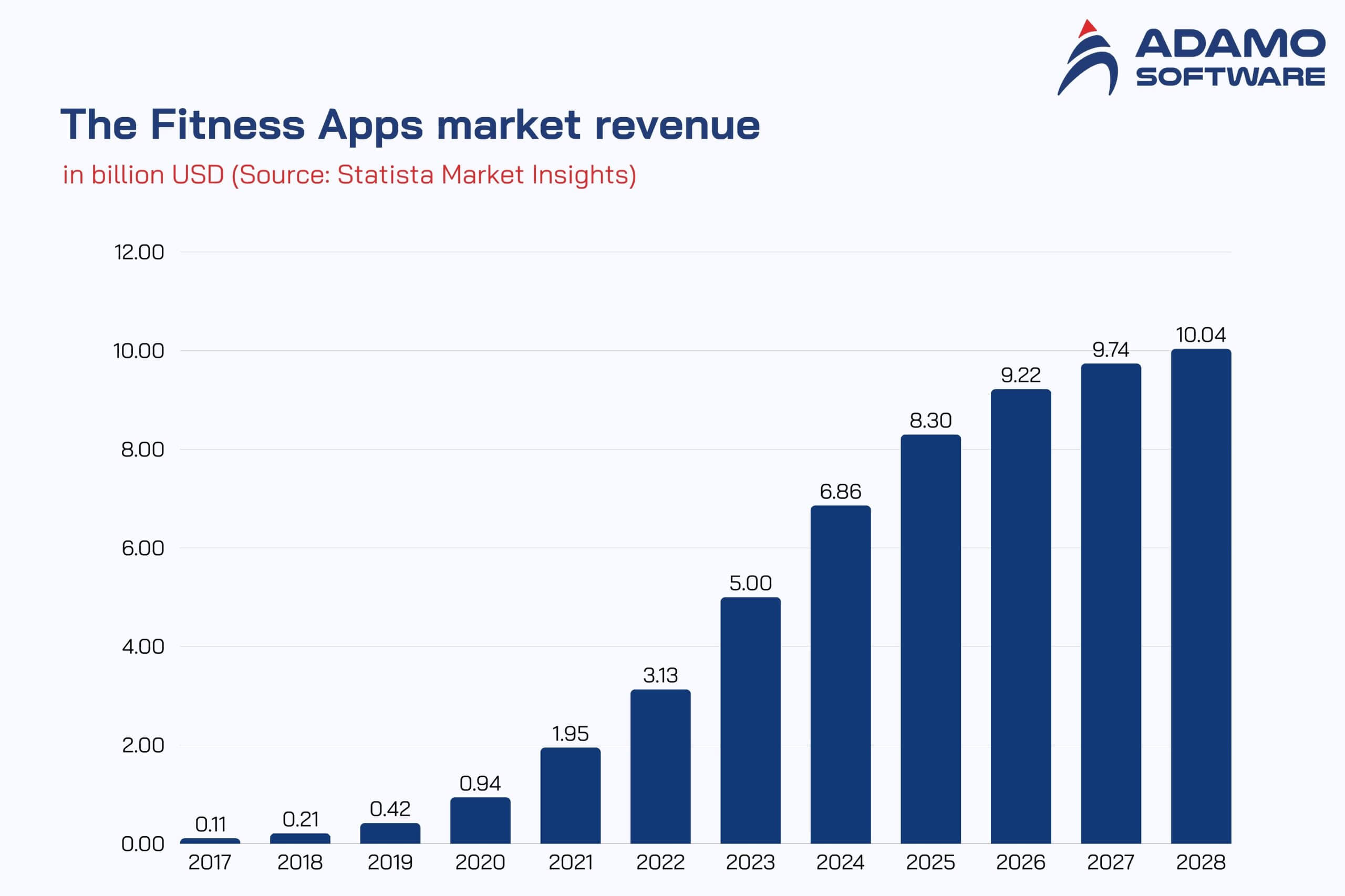
Today, the fitness tracking app market continues to grow exponentially. The growing health awareness and the popularity of digital wellness solutions fuel it. The top popular apps include MyFitnessPal, Strava, Peloton, Lose It! and Fitbit, each of which holds a significant market share.
These fitness tracker apps stand out for their user-friendly interfaces, comprehensive features, and ability to create engaging communities. For example, MyFitnessPal excels at nutrition tracking, Strava excels at social fitness sharing, and Peloton is chosen for its live and on-demand workouts. There’s also Lose It! for weight management, and Fitbit for its seamless integration with wearables.
According to Statista, MyFitnessPal topped the revenue charts in January 2024. It generated over $12 million, highlighting its dominant position. Overall, the global fitness tracking app market is expanding rapidly. Allied Market Research predicts the market will reach $120.37 billion by 2030.
This rise, coupled with the growing demand for personalized health solutions, has opened opportunities for new entrants. However, there is still room for innovative apps that cater to specialized fitness needs or offer unique features, allowing entrepreneurs to develop their popular fitness apps.
II. Types of apps to track fitness
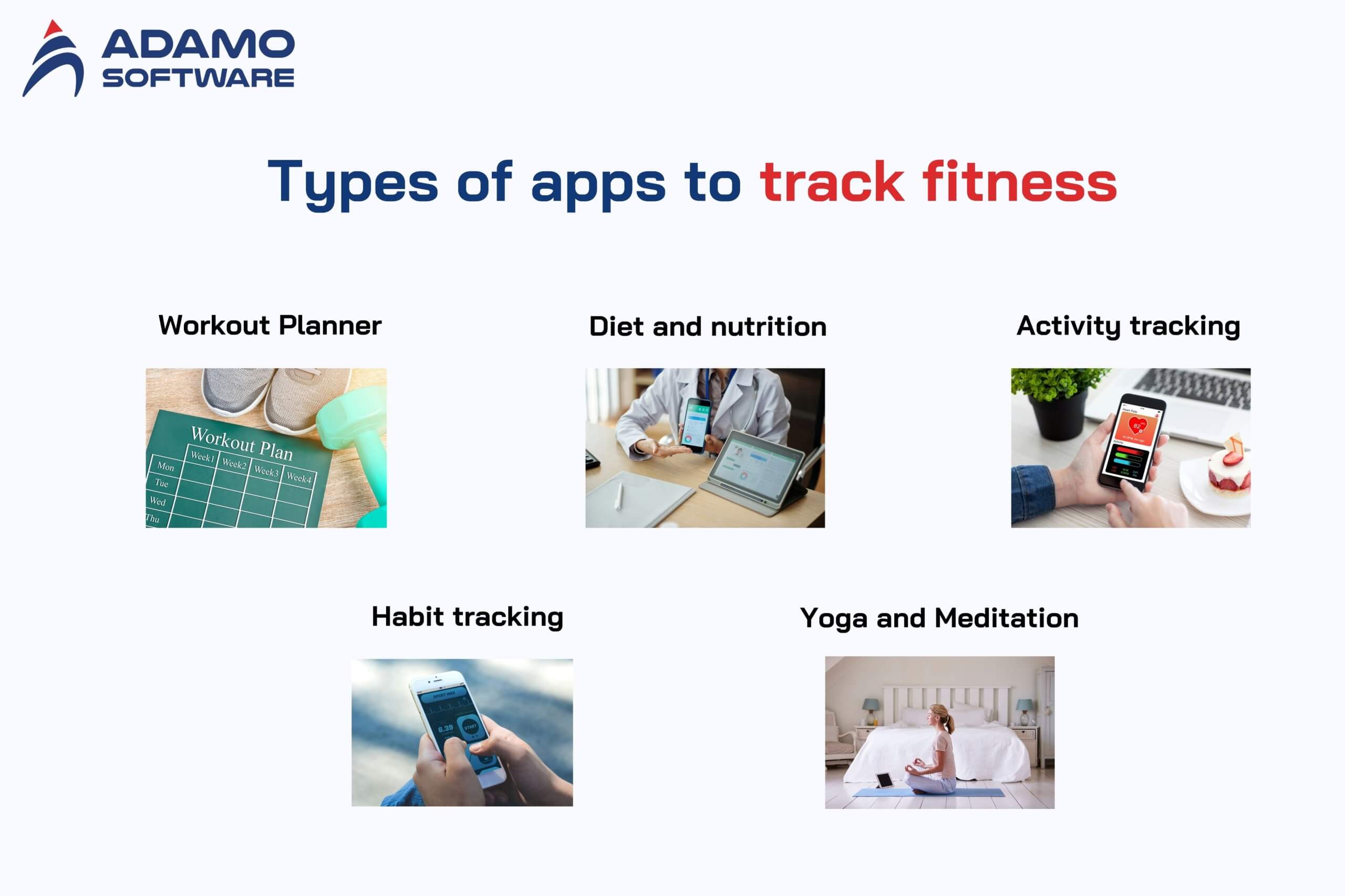
Fitness tracking apps help with various health concerns: finding the right exercise or stopping exercise altogether. Here are five popular types of fitness tracker apps:
1. Workout Planner
These fitness tracker apps offer three main types of workouts: strength, endurance, and mobility. With personal training apps, users can choose from pre-built workout plans or create their own.
The app’s exercise library often includes descriptions or demo videos to help users exercise safely and effectively. In addition, fitness tracker app users can adjust the difficulty level, schedule workouts, and track progress.
Many fitness tracker apps today integrate IoT with wearable devices such as fitness bands or smartwatches. This allows users to track health indicators easily.
2. Diet and nutrition
Apps that help diet and nutrition menus help you track your eating habits, count calories, and stay hydrated. This app lets you check your calorie intake and find suitable nutritional recipes.
Typically, diet and nutrition apps include:
- Food data sheet — allows users to find information about the calories, protein, fat, and carbohydrates of a food and product;
- Calorie counting app — helps calculate the daily calories consumed and burned depending on the user’s body, such as age, gender, height to weight ratio;
- Meal diary app — allows users to record data about the meals they have eaten while on a diet.
3. Activity Tracking
People have been buying wearable devices more often in the past few years, like the Apple Watch, Xiaomi Mi Band, and Smart Watch. With the help of these smart devices, users can count their steps, measure their heart rate, and even their stress levels during the day.
Professional athletes and companions use health tracker apps for those who want to keep track of their health indicators. Think ahead about the potential of your fitness tracking app and add the feature of syncing with wearable devices because users will appreciate it.
4. Habit Tracking
A good habit leads to success in everything. Health and fitness apps can help users break bad habits, form good ones, and gradually start a healthy lifestyle. Effective workout habit trackers often include features such as Customizable goals, Visual progress displays, Timely reminders, Chain counting, and Setting adjustable goals with a history kept. These elements help users stay accountable, motivated, and informed about their progress toward forming healthy lifestyle or healthy eating habits regularly.
These elements work together to keep the fitness app users accountable, motivated, and informed about their progress towards creating healthy habits.
5. Yoga and Meditation
Meditation and yoga apps offer a wide selection of yoga and guided meditation sessions, allowing users to access the app and practice anytime, anywhere.
Common yoga and meditation tracking softwares have a diverse content library:
- Guided yoga sessions for users of all skill levels and styles.
- Meditation sessions range from brief mindfulness exercises to extended, immersive practices.
- Breathing exercises and relaxation techniques.
- Progress tracking and personalized practice recommendations.
- The educational content on yoga philosophy and mindfulness principles.
III. How to implement Fitness Tracker App development: Step-by-step guide
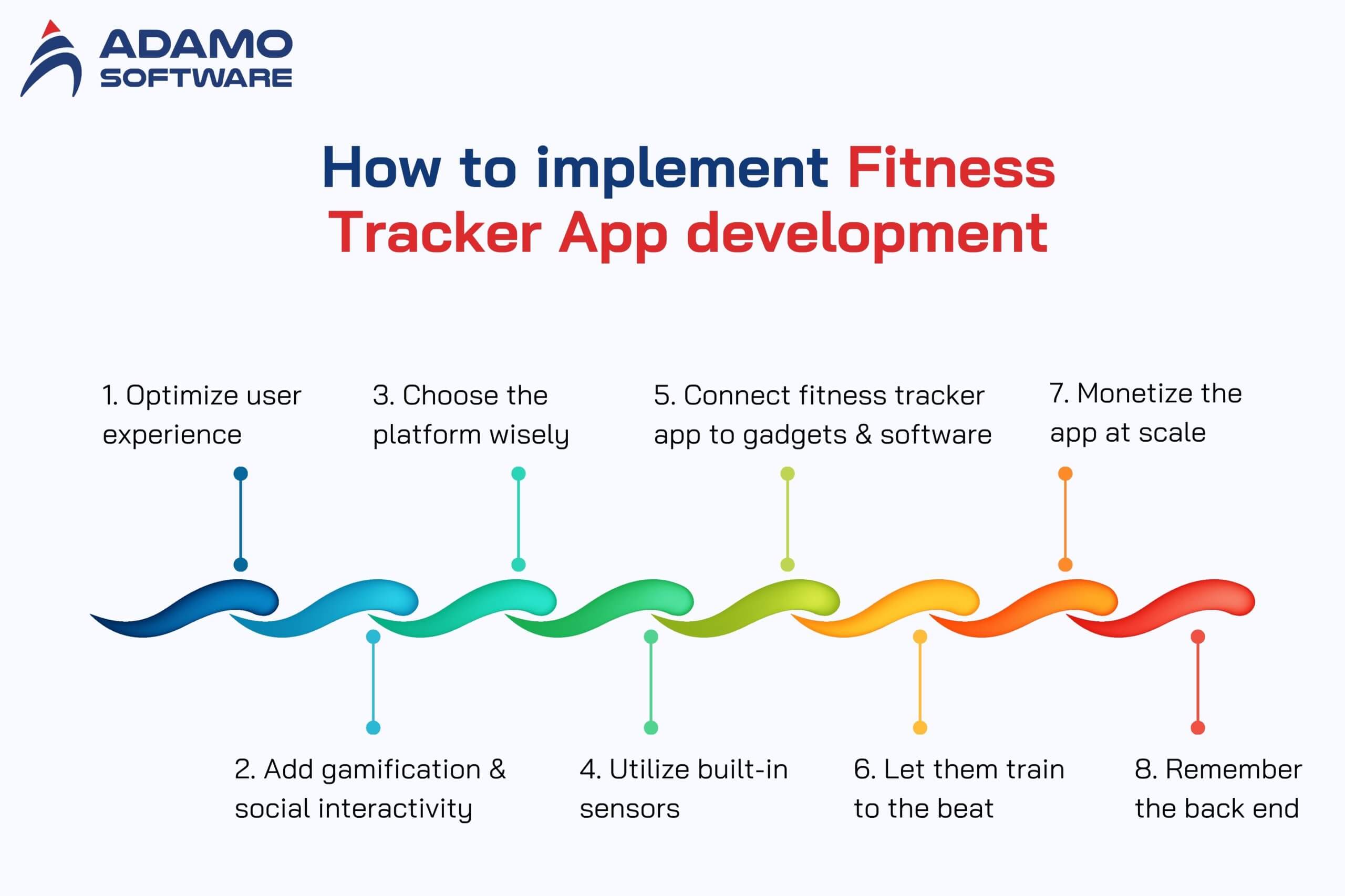
Building a fitness tracker app involves many aspects, from tracking and visualizing activities to streaming and organizing video workouts. Let’s cover the essential points to help your app shine.
Step 1: Optimize user experience
A user-friendly app is always at the core of a positive experience, especially when you develop a fitness tracker app. You should consider UI and UX so users can perform any action with just three or four taps. The app can also stream workouts or offer video class features.
- Be creative with packaging your workout classes (descriptions, images, playlists).
- Provide filtering so that users can quickly find classes or workouts of their choice.
- Design icon times for live classes.
- Allow users to switch profiles to work out flexibly on the same device, like a tablet or laptop.
- Video classes should be downloadable to avoid network connection issues during workouts.
Once you have created engaging and accessible workout packages, you should focus on the in-class experience.
- Show users their progress while they are in class.
- Avoid clutter on the screen and only display relevant stats that matter.
- Visualize users’ performance after class ends with beautiful charts.
Step 2: Add gamification and social interactivity
A user-friendly design is the heart of a great experience, especially when it comes to developing a fitness tracker app. You should consider UI and UX so users can perform any action with just three or four taps. The app can also stream workouts or offer video class features.
- Be creative with packaging your workout classes (descriptions, images, playlists).
- Provide filtering so that users can quickly find classes or workouts of their choice.
- Design icon times for live classes.
- Allow users to switch profiles to work out flexibly on the same device, like a tablet or laptop.
- Video classes should be downloadable to avoid network connection issues during workouts.
Once you have created engaging and accessible workout packages, you should focus on the in-class experience.
- Show users their progress while they are in class.
- Avoid clutter on the screen and only display relevant stats that matter.
- Visualize users’ performance after class ends with beautiful charts.
Step 3: Choose the platform wisely
Mobile apps today are available on smartphones and other devices such as TVs or tablets. Each platform offers a unique way to enhance the user’s fitness life.
- You can take advantage of the larger screen space available in the TV or tablet version of the app. It is unnecessary to display more information, but it can be presented more graphically and visually.
- Unique sensors and other hardware available on each platform can be used to collect more data about the user’s performance.
- Integrate instant sync so that the user can temporarily switch from outdoor activities to indoor exercises by switching from the iPhone fitness tracking app to the iPad version.
- Use the Apple Watch app as a remote control to start/stop a workout.
Step 4: Utilize built-in sensors
As we said, fitness tracking apps are increasingly adding value to users’ lives if they get them to exercise regularly. Therefore, being able to display their progress using the data collected during their workouts is essential.
Let’s have a look at what hardware is available in this regard:
- GPS allows you to visualize the location of paths on a map. A compass will help users navigate while they are running.
- Accelerometers can measure altitude or track body movements when combined with gyroscopes.
- Motion processors count steps.
- Some Android phones also have an optical heart rate monitor on the back.
- Barometers and altimeters provide accurate data on altitude, latitude, and longitude.
However, the bottom line is that you should carefully research the built-in sensors available on the phone or smartwatch you are targeting and take advantage of the data they collect. So, opt for native apps as they have full access to the built-in sensors, etc.
Step 5: Connect your fitness tracker app to gadgets and software
If there aren’t enough built-in sensors, you can connect your app to various health and fitness trackers like Fitbit or Galaxy Fit. This works best if you need to connect your app to a user’s activity tracker.
- Use activity data from external sensors to tailor your user’s experience in your app: highlight their favorite exercises to motivate them to work out more or suggest taking a break.
- Add data to your user’s stats to get a more comprehensive view of their performance.
Another variation to get this additional data from third-party trackers and apps is to connect to HealthKit, Google Fit, and Samsung Health. It depends on your app’s target platform. These tools act as health and data aggregators, so your platform can do it with a single integration.
- Ensure PHI is protected as required by HIPAA.
- Secure access to critical data in the app using Face ID or Touch ID.
- Remember that integration with HealthKit and other health and fitness data aggregators works both ways: you can collect and send user data.
- You should also consider integrating with stock calendars, so users don’t miss live classes.
Step 6: Let them train to the beat
Music is a huge part of your workout. A motivational or energizing song can go a long way in making a healthy workout. Connecting to streaming services like Apple Music, Spotify, or Google Play Music can give you a leg up on the competition.
- Use Apple’s MusicKit to integrate with Apple Music.
- There is no official Google Play Music API. However, you can use this unofficial, well-maintained version or wait for the YouTube Music API.
- SoundCloud and LastFM are two other great alternatives for getting some tunes into your fitness app.
Step 7: Monetize the app at scale
The Peloton app is a great example of how a fitness app can make money. The company sells high-end home exercise bikes and treadmills and then offers subscriptions within their app. The app is available to anyone, so users who don’t have Peloton fitness equipment can feel like a privileged group without having to pay too much.
- Implementing a subscription payment option within the Apple or Google ecosystem is relatively easy. However, consider the platform owner’s 30 percent cut.
- Another variation is in-app purchases, which can be less convenient for users.
- You can also follow Amazon’s lead and limit users to purchases only through a website that opens right inside the app via a web view.
Step 8: Remember the back end
One of the biggest challenges in developing a fitness app will be the streaming of classes, their availability at all times, etc. Of course, that’s just the backend: the servers that host and stream the workouts and the software that makes it all work.
- Ensure your backend is built on a CDN infrastructure if you aim to reach customers in various locations, particularly on a global scale.
- Design a minimal web UI for your employees to upload and manage classes, payments, and other content within the fitness app.
- AWS, Google, and Microsoft are excellent cloud providers to support the infrastructure of your fitness app.
IV. How much does it cost for fitness tracking app development?
Developing a health tracker app is a big investment. It depends on factors like the number and variety of features, the complexity of the software, and ongoing support. This section will explore how much it costs to develop a health app. It covers the essential aspects of determining the cost, methods for estimating development time, and budgeting strategies for future updates to maintain the app’s value.
The cost to develop a fitness tracking app like Peloton ranges from $92,050 to $145,000, depending on the features and platform choice. Let’s recap the key factors that influence the cost of app development.
- Key cost factors include platform selection, custom UI/UX design, backend development, API integration, physical device integration, testing and QA, ongoing maintenance, and support.
- Essential features like instructor-led classes and live sessions with real-time feedback. Additionally, integration with wearables significantly impacts both development costs and user engagement.
To reduce the cost of developing a fitness tracking app, consider outsourcing your IT team, validating your idea early, creating an MVP, and leveraging third-party resources for non-core features.
The estimated cost of developing a Peloton-like app can be huge, especially with a well-planned growth and monetization strategy.
Also read: Top 15+ advanced Fitness Tracker App Features to consider in 2025
V. Popular monetization strategies for fitness tracking apps
Let’s dive deeper into monetization models and how you can monetize your fitness apps. The secret to effective monetization lies in striking the perfect balance between delivering value to users and ensuring steady revenue for your business.
1. Ads
One way to monetize is to add ads for other brands to your fitness app. This way, everyone is happy:
- Brands get to increase sales.
- Users get the app for free.
- You earn money from ads.
This model can be particularly effective for smartphone fitness apps. Its large user base allows you to generate revenue without charging users directly. However, it is important to implement effective ads that do not disrupt the user experience. You can explore native ads, rewarded video ads, or banner ads.
2. Paid Apps
Selling a fitness app on the store is not a safe bet for a startup. Customers will only pay if they see a quality product. However, you can always offer users a trial version and add relevant in-app purchases. Remember that while this model can generate revenue initially, it can limit your app’s reach compared to free alternatives.
3. Subscription
Users need to subscribe to gain access to and use the app’s extended functionality. Extend the trial period so users can experience and evaluate the quality of your fitness app.
Subscription models are becoming increasingly popular because of their ability to provide consistent revenue. Ensure your subscription offers clear value over the free version and continually add new features or content to keep subscribers returning.
4. Freemium
The app’s basic functionality is available to everyone. Users only pay for additional or expanded premium features like ad removal, schedule access, personal trainers, or personalized training plans. You can combine this strategy with other monetization models.
The key to a successful freemium model is to balance providing just enough value in the free version to attract users while still creating compelling offers.
VI. Fitness Tracker App Android: Top 6 apps to keep you healthy
1. Google Fit: the ultimate tracking app for Android users
Google Fit is a great fitness tracker app Android users love, especially if you want a clear view of your health. It records calories, keeps a map of your runs, and monitors your heartbeat.
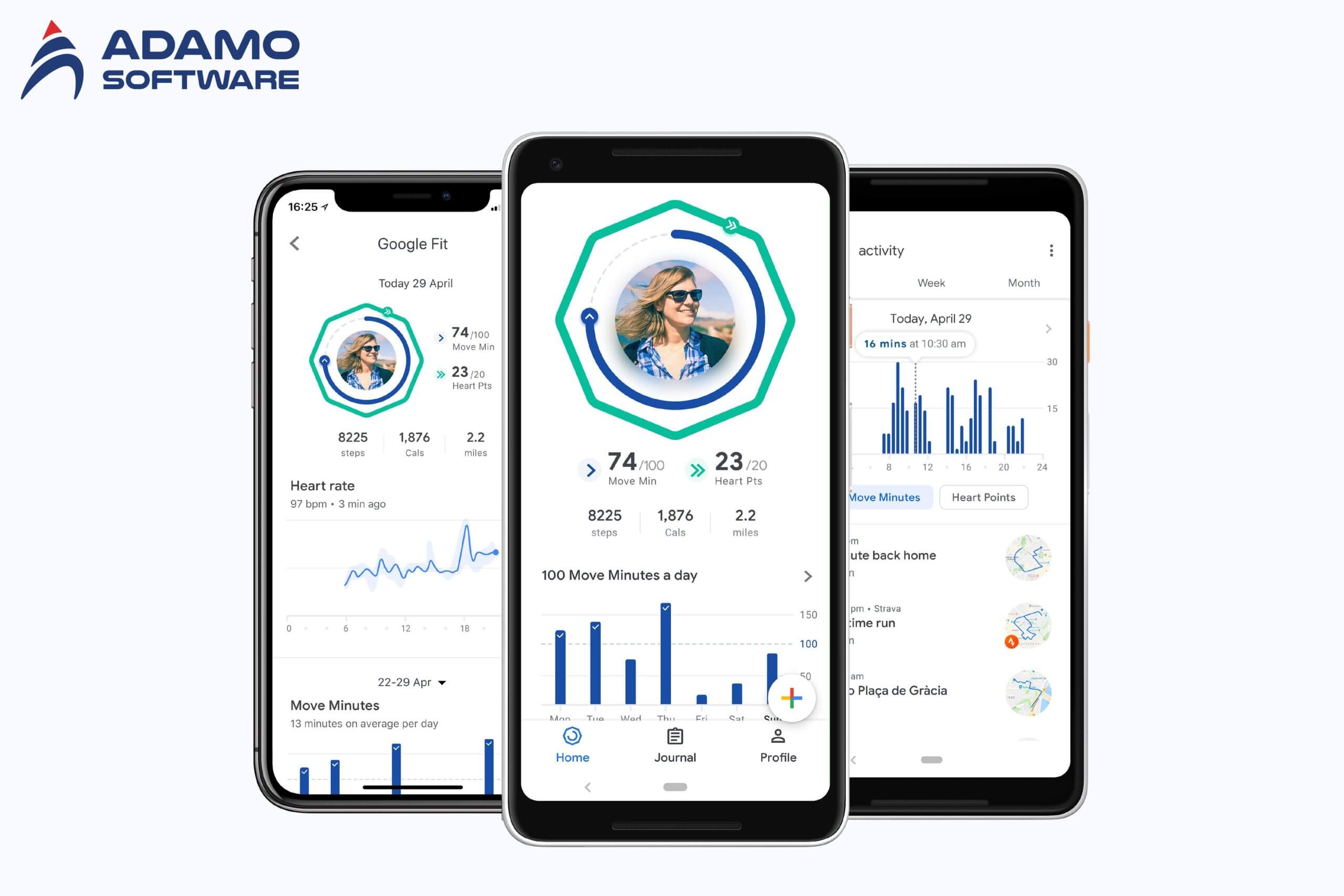
As this is the default app for Wear OS Smartwatches, this fitness tracker app android option is perfect for Android users. Unlike Garmin, Google Fit really stands out with its ‘move minutes’ system. When it comes to tracking your daily activity, it keeps count of how many minutes you spend actively.
Additionally, it rewards higher-intensity activities such as brisk walks and runs using ‘heart points.’ This android app fitness tracker tool logs steps, distance, calories burned, and heart rate beyond the basics. It tracks your weight and sleep, too.
Essentially, Google Fit is one of the most complete fitness tracker apps for Android users.
2. Nike Training Club: Best free app for on-demand workouts
You can enjoy a great free fitness tracker app android user with Nike Training Club providing a complete experience.
It’s an app for everyone, with customized program pace options and individual workouts available. It is unique because it is inclusive compared to many other fitness tracker app android.
Nike Training Club offers a selection of nearly 500 workouts that are available on-demand at little to no cost. You can find routines for yoga or for high-intensity interval training, or anything in between, depending on your goal.
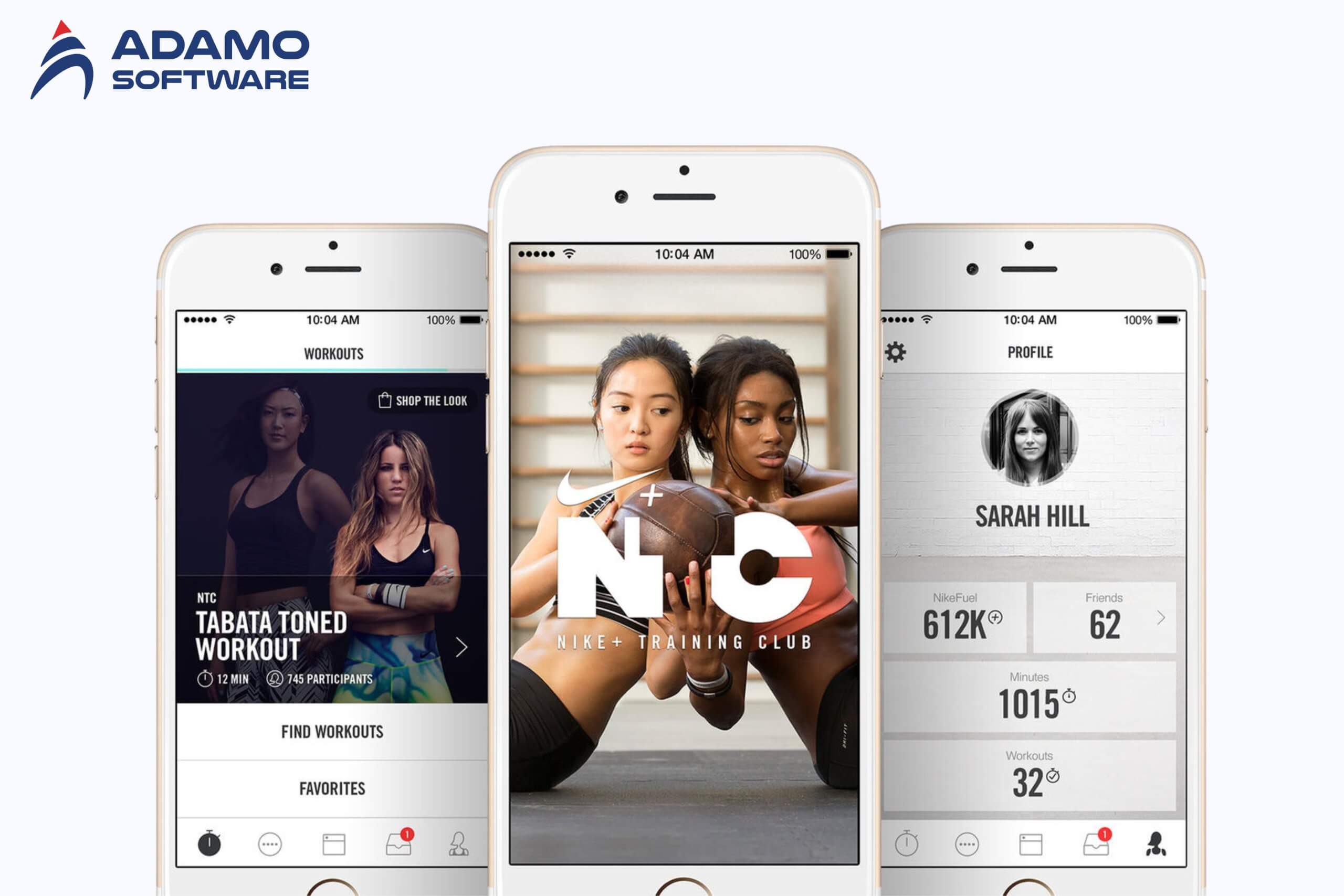
Nevertheless, it has some disadvantages. Only the workout frequency and duration can be tracked, and vitals such as heart rate are not monitored.
The other limitation is that you cannot do multiple programs simultaneously, which can be a bummer for some. While these flaws exist, Nike Training Club is an incredible value out of a free app.
3. FitOn: Home workouts and stress relief in one app
FitOn is a handy fitness tracker app android users trust for home exercises, plus stress management.
Ideal for at-home fitness enthusiasts, the app offers a wide range of workouts – from cardio to yoga, pilates, etc. FitOn even offers 10-minute workout options if you’re short on time. FitOn has you covered whether you want to target specific body parts or build a customized fitness plan.
This fitness tracker app android tool is more than workouts, it includes stress management resources. It helps you support your mental well-being with guided meditations that stress that mental health is just as important as physical health.
FitOn is a blend of fitness and mindfulness, which makes it a must-have app for maintaining overall wellness.
4. Sleep as Android: Improve sleep for a healthier lifestyle
Sleep as Android is a spectacular app that is good with any fitness tracker app Android users have at the moment. It can help build a healthier lifestyle by promoting better sleep.
This app received Google’s Editor’s Choice award for the daily stats of how you slept and long-term sleep trends. The alarm feature is unique, with gentle waking you with wrist vibrations or customized sounds so you wake more refreshed.
Sleep as Android builds up a sleep score that indicates just how rested you are over time. They make it a wonderful company for enhancing workouts, mental health, and general well-being.
If you are an Android health tracker serious about your sleep, you’ll want to add Sleep as Android to your toolkit.
5. Strava: The social fitness tracker for competitive spirits
If you are a fitness tracker app android user, Strava is a unique app that combines robust tracking features with social media-like interaction. It tracks runs, bike rides, swimmers, and more, with mapped routes and segment-specific leaderboards.
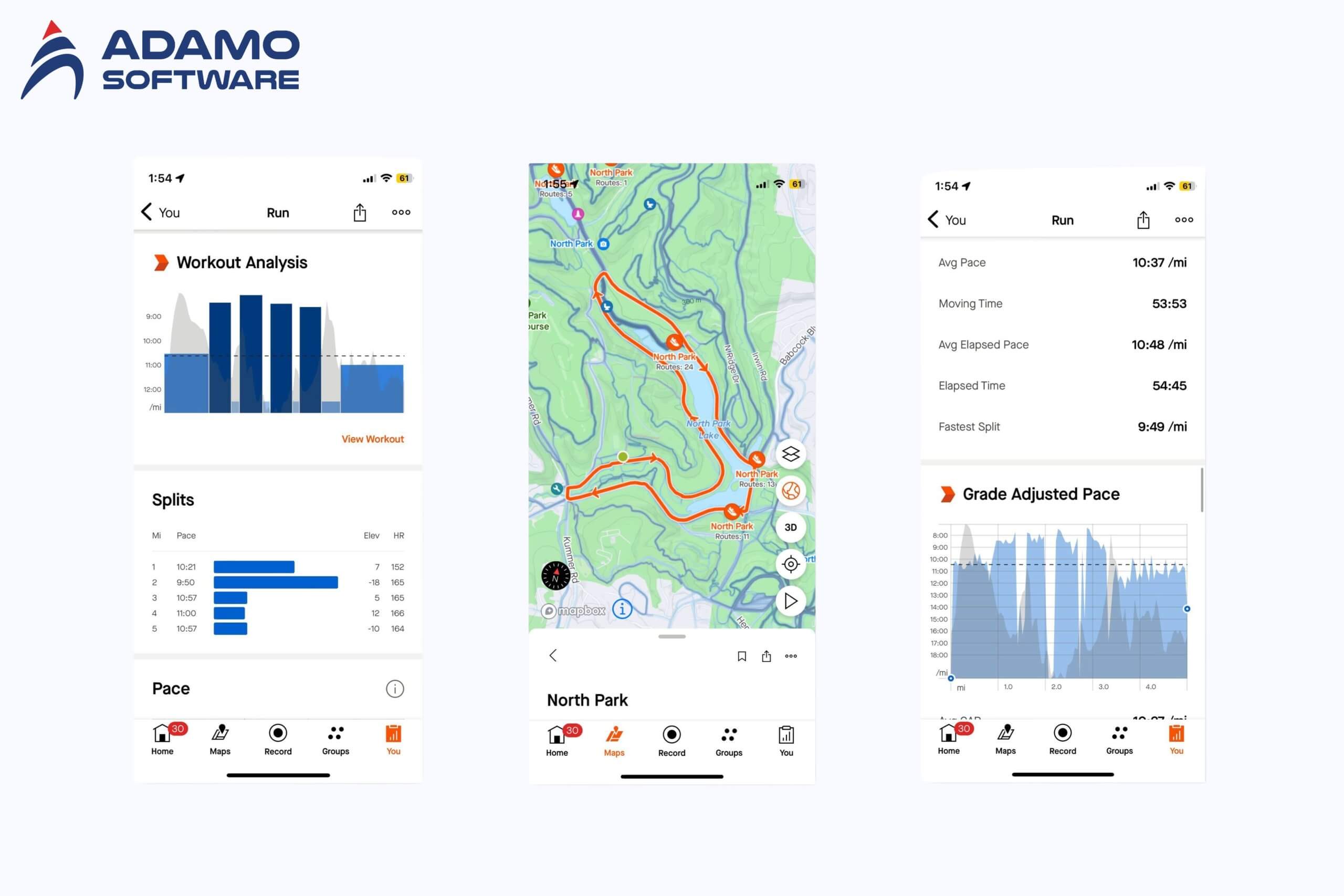
The app’s Explore tab connects users to local fitness events, user-generated challenges, and popular geographical routes. If you are a goal-oriented consumer, weekly and annual targets will ensure motivation remains high.
The one area where Strava differentiates itself is that it places a big focus on building its community. Friends can be connected, activities can be posted to a feed, and users can compete with one another in their area. Compatible leaderboards make it easy to compare and compete, and even nearby clubs lend a friendly competitive edge to your game.
There have been privacy concerns — especially the potential for exposing data for runners. They can manage risk by hiding personal details and setting privacy settings to their liking. However, according to Strava, despite these concerns, more than 100 million global users trust this fitness tracker app Android.
6. Samsung Health: A Comprehensive Tracker for Samsung Device Users
People who use Samsung devices can use Samsung Health as a versatile fitness tracker app android.
The user’s overall health is understood, and it is improved through the app, which provides good personalized insights and coaching. Moreover, the incorporation of Samsung wearables makes tracking both accurate and seamless.
Samsung Health provides many advantages but also has some limitations. Its features may be restricted for non-Samsung device users, and ads are visible in the free version. However, the app is an all-in-one fitness solution for Samsung users without a subscription.
This fitness tracker app android tool is a perfect choice if you own a Samsung device and are keen on managing your life and health.
VII. Top 5 highly recommended iPhone fitness tracker apps
1. Apple Fitness
Apple Fitness is among the outstanding iPhone fitness tracker apps that you should use. The app allows you to exercise any time anywhere when you want. Apple Fitness’s exercises are diverse with different levels of fitness. There are light exercises suitable for living rooms, bedrooms, and parks, and heavy exercises suitable for the gym. You can choose short exercises of only 5 minutes or long exercises of 45 minutes depending on your time and health condition. There is a variety of exercises from gentle meditation to strenuous running and jumping suitable for many groups of people. Below are some features that make Apple Fitness one of the most superior iPhone fitness tracker apps.
- Beginner Level Options
- Workout Summary
- Personalized Workout Recommendations
- Use SharePlay to work together in Groups.
- Pause or Resume Workouts from Multiple Devices.
- Advanced Workout Filters
- Guided Meditation.
Besides the above features, Apple Fitness also has many other features and exercises. Using this app, you can personalize your workout journey and know how many calories you have burnt.
2. Carrot Fit
Carrot Fit is one of the iPhone fitness tracker apps that combines humor and fitness with sarcastic AI-guided workouts. The AI construct aims to help you get fit and healthier by threatening harm, offering rewards, ridiculing, and bribing you. Below are some excellent features of Carrot Fit.
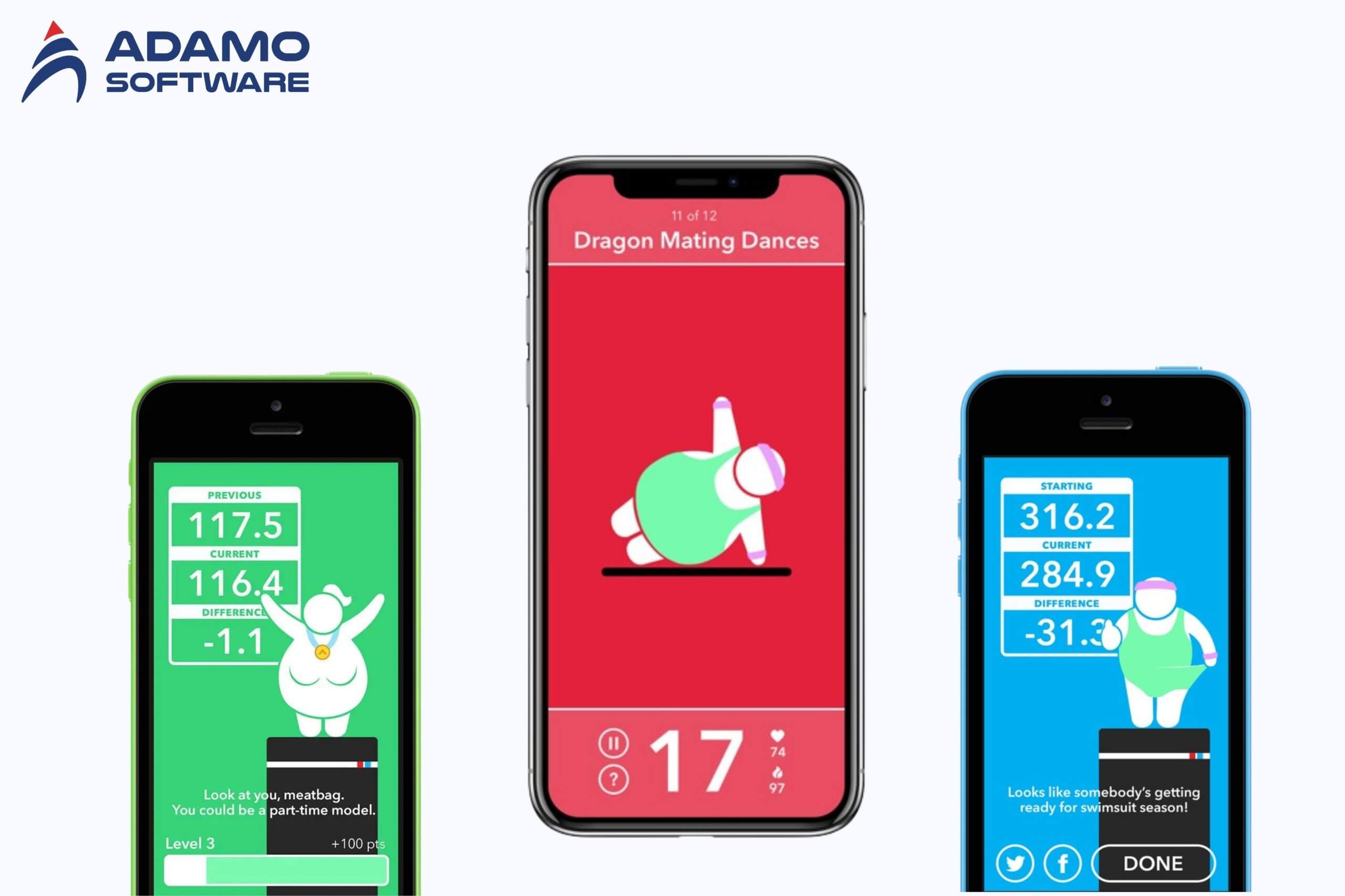
- Hilarious AI workout buddy: Work out with a funny and motivating AI companion.
- Extensive audio coaching: Enjoy over 3 hours of spoken tips, encouragement, and ridicule
- Unique workouts: Travel through time, protect your property, and appease ancient gods in 12 original exercises.
- Additional workouts: Unlock 12 more challenging workouts with an in-app purchase.
- Apple Watch integration: Use your Apple Watch as a heads-up display for workout guidance.
- Daily weight tracking: Record your weight daily to monitor progress.
- Cute avatar: Bond with your adorable and customizable avatar.
- Level-up system: Earn rewards and level up as you achieve your fitness goals.
- Workout reminders: Never miss a workout with personalized reminders.
- Weight progress tracking: Visualize your weight loss journey with a clear graph.
- Goal setting: Set ambitious weight loss goals to inspire you.
- Step tracking: Monitor your daily step count.
- BMI tracking: Assess your body mass index to gauge your overall health.
- Health app integration: Sync your fitness data with Apple Health for comprehensive tracking.
3. ECG
ECG is one of the most prominent iPhone fitness tracker apps, which helps you measure your heart rate. This app is designed to monitor your heart health in detail and accurately. The app allows you to record an electrocardiogram right on your device, helping to detect problems such as atrial fibrillation or irregular heart rhythms early.
With an intuitive interface, ECG provides easy-to-understand data and detailed reports on heart rhythm, helping you share this information with doctors for in-depth medical assessment. When there is any abnormality, the app will warn you so that you can be proactive in taking care of your cardiovascular health.
Combined with Apple Health, ECG offers a comprehensive solution for health management, from daily activity tracking to assessing cardiovascular health. It is an indispensable tool for those interested in protecting their hearts.
4. Cardiogram
Among the iPhone fitness tracker apps, Cardiogram is the ultimate app to track and better understand your heart health. Integrating with the Apple Watch and other wearables, the Cardiogram provides a visual heart rate graph that helps you identify trends or irregularities in your heart activity.
The app will provide you weekly health report card scores and risk scores for hypertension, sleep apnea, and diabetes so you can track your progress in preventing or managing these conditions. Interactive, color-coded charts let you pinch to zoom in on detailed heart rate data, steps, timed symptoms, medications, and recorded blood pressure readings. An ECG lets you see the connection between your symptoms, how you’re feeling, and heart rate information that you can share with your doctor. You can also set heart rate alerts for high and low readings and connect family members so they can see your data.
5. Lifesum: Diet & Macro Tracker
Unlike the above iPhone fitness tracker apps, Lifesum: Diet & Macro Tracker does not provide you with training courses but with nutritious diets that fit your lifestyle and taste. The app offers comprehensive features for managing your diet and nutrition. It features a food diary with barcode scanning, calorie counting, and macro tracking to monitor protein, carbs, and fats, along with food ratings.
Using the app, you can track water intake, follow diet plans for weight loss or body composition, and explore intermittent fasting. Meal plans with grocery lists simplify meal prep, and integration with fitness trackers ensures seamless health monitoring. Based on your goals, Lifesum will provide personalized nutrition recommendations.
VI. Why choose Adamo as your partner for Fitness Tracker App development
At Adamo Software, we have extensive experience developing secure and scalable fitness tracker tracking apps. We focus on user-friendly design, robust security, and compliance with industry regulations. Our health tracking apps are built to deliver a seamless experience while meeting the highest standards.

You can trust Adamo to deliver healthcare solutions that exceed expectations and help your business thrive in the competitive health app market.

 adamosoft.com
 (+84) 373 11 44 88