

Mobile application architecture diagram: Best practice in 2026

A mobile application architecture diagram entails many layers and components that are platform and native/hybrid-specific.
Smartphones have become the primary computing device for billions of users worldwide. People rely on them for work, communication, shopping, entertainment, healthcare, and almost every other aspect of daily life. As mobile usage continues to grow, the demand for well-architected mobile applications has grown alongside it.
As a result, software development companies that comprehend the complexities of mobile application architecture diagrams are thriving. The tools and methodologies for mobile app development are evolving, allowing developers to create high-quality cross-platform products in a relatively brief amount of time.
I. What is a Mobile Application Architecture Diagram?
A mobile app architecture diagram depicts the design elements and components of an application. It addresses the “how,”, which alludes to the back-end processes required to create a functional and efficient mobile application.
This type of diagram must be created as part of the initial app development procedure. It helps software developers and stakeholders visualize the purpose and creative process behind the development of the mobile app’s final product. It also assists teams in determining the appropriate technology stack, database features, UI and UX design, application platform, and essential mobile app functionality.
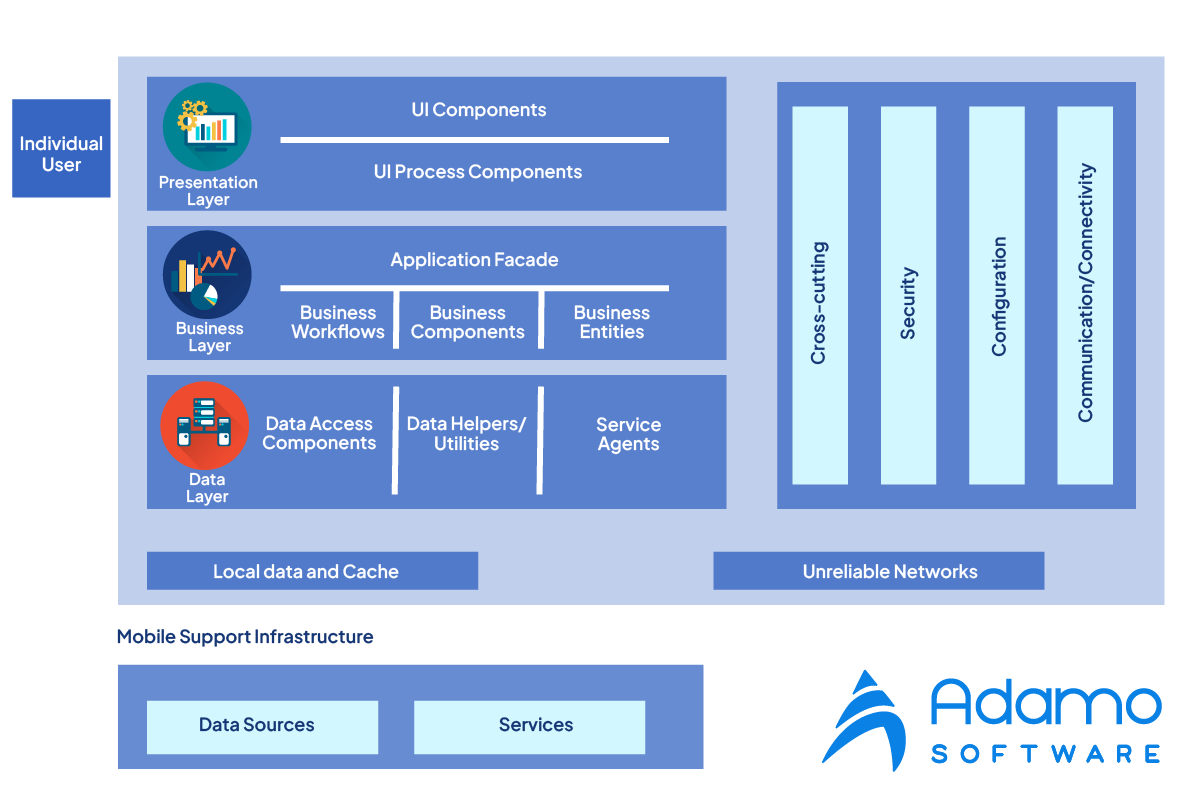
Good mobile app architecture diagrams are beneficial in 3 ways. They aid in identifying system processes, permit feedback (via notations), and provide visual context. The primary context consists of the following:
_ Identify system processes
_ Allow feedback
_ Gives visual context
1. Identify System Processes
An excellent mobile application architecture diagram depicts the relationship between the app’s components and processes. This includes UX design, database, administration, and software functions. A logical diagram of the app’s process flow and functions can assist developers in visualizing the mobile app concept.
2. Allow Feedback
A well-designed mobile application architecture diagram will enable the developer to add germane project notes and comments. This assists and informs the development process for mobile apps. These notations also aid non-technical marketing teams and stakeholders in comprehending and making sense of the final product.
Notations consisting of symbols, keys, graphs, and remarks aid non-coders in describing the concept of the mobile app under development.
3. Gives Visual Context
Visibility among other team members facilitates participation in the app development process. With the aid of this mobile application architecture diagram, both software experts and non-coders will be able to comprehend the concept of the mobile app that is currently being developed. Individuals can therefore contribute to the final product and even influence the architecture of the mobile app during the design phase of development.
Before diving into diagrams, make sure you understand the fundamentals of mobile app architecture and the key patterns involved.
II. What Are the Basic Elements of Mobile Apps Architecture?
These are the most important factors to consider when developing a mobile application architecture diagram, as they determine the most fundamental components. These elements include user experience, or UX in programming parlance, navigation, network strategy, and the device being utilized. Let’s examine each of the following items individually:
1. User Experience Design
A well-designed UI is essential to the mobile application architecture diagram. This will provide consumers with an engaging and seamless mobile app experience. During the app development phase, the developers’ design decisions are reflected in the UI/UX outcome. The mobile application architecture diagram typically reveals whether or not a software developer has considered the requirements of the end users.
When developers pay close attention to the UI/UX design of mobile application architecture diagrams, the result is a mobile app that is intuitive and user-friendly.
2. Network Strategy
The efficacy of a mobile app will be enhanced by a well-designed mobile app architecture diagram under varying bandwidth conditions. Your mobile app architecture diagram should be designed to function in various network environments, as no two mobile networks are identical.
The usability and efficacy of a mobile application will be improved by a flexible architecture. The mobile application architecture diagram that incorporates these features appeals to a broader spectrum of users with varying network bandwidth capabilities.
3. The Navigation Strategy
An efficient mobile application architecture diagram is characterized by app navigation that is both sleek and straightforward. It should be simple and pleasurable for a user to navigate through the various components of a mobile app. A mobile app’s navigation method can be layered, modal, or single-view. The placement and labeling of navigation elements within a mobile app are necessary for its intuitive design. Good navigation design enables users to intuitively utilize the app’s features.
An efficient mobile application architecture diagram reduces the friction caused by time-consuming and superfluous navigation features. Inadequate navigation design frustrates app users, who may abandon your mobile app entirely. This frustration may be exacerbated by the possibility of navigational flaws that cause glitching, slow results, or errors.
By establishing a logical order for the navigation interface, developers ensure that the UX of the mobile application architecture diagram is pleasurable and intuitive. The navigation of a mobile app that is simple and intuitive is always appreciated by its users. Navigation is one of the first interactions that users will have with your mobile app, so you should strive to provide the best UX possible.
4. Used Device
During app development, the mobile application architecture diagram incorporates flexible design and functional elements. This ensures that the mobile app is compatible with a wide variety of devices and displays.
III. How to Choose Mobile Apps Architecture Diagrams?
Then, what constitutes the finest and most effective technology foundation or mobile application architecture diagram? Mobile application architecture diagram success requires the following parameters:
1. Logical Clear Definition
A smart mobile application architecture diagram has a clear data flow. The mobile app architecture must use industry-standard software development standards. Thus, mobile app development is not limited to one team. Logical data flow and software concepts allow other developers to make adjustments. Thus, if your software development team changes, another developer can continue mobile app development.
2. Flexible Use Across All Platforms
The mobile application architecture diagram should support a wide variety of devices and platforms. For example, good mobile app architecture would be compatible with both Android and iOS systems.
3. Stackable technologies
The scalability of the mobile application architecture diagram enables future mobile app expansion, updates, and enhancements. Although this may initially require more resources, agile app development pays off in the long term for businesses. This is because a scalable mobile app will make it easier to add to the technology stack without the need to rebuild the entire app to satisfy the business’s demands each time.
4. Completely efficient
A mobile application architecture diagram that is efficient at data processing, navigation, and app function execution is optimal for mobile apps.
5. Easy to maintain
Mobile applications with a low-maintenance architecture require few resources for their management.
IV. Which Is The Best Mobile Application Architecture Diagram?
So, which mobile application architecture diagram is considered the finest? To choose the optimal mobile application architecture diagram, developers must consider the platform, intended end-users, data processes, essential app functions, and budget. Typically, developers have the option to choose and implement the mobile application architecture diagram of their choosing. Native, web-based, and hybrid mobile architecture and technology stacks are the three options available to them for getting begun.
The selection is based on their individual preferences and the style with which they are most at ease.
1. Native Mobile Apps: Android & iOS
Native mobile apps are built specifically for the device they run on, designed to operate on mobile devices in various conditions. Because they reside on the home screen of mobile devices, native apps are most useful in adverse circumstances.
For example, native apps can operate efficiently via the device’s home screen in environments with limited or no network bandwidth. Native apps are not intended to be cumbersome and are constructed using a lightweight mobile application architecture diagram.
Consequently, native apps process data efficiently and are intuitively designed. Native apps are also adaptable, user-friendly (UI) applications for users working offline or in low-bandwidth environments. The adaptability of these native mobile apps enables their efficient operation on a vast array of physical devices with varying dimensions. Native apps function well on various platforms, including Android, iOS, and the web.
Native apps have the disadvantage of being developed for the platform on which the mobile application architecture diagram resides. Native apps are not based on cross-platform technology, which can make scaling across multiple platforms challenging. Consequently, app developers may be required to create an entirely new app to accommodate new enhancements or modifications across platforms.
_ Mobile app architecture on Android
There is no specific mobile app architecture for Android, and Google does not mandate a single architecture pattern. However, Google’s official Guide to App Architecture recommends a layered approach with UI, Domain, and Data layers, which aligns closely with Clean Architecture principles. This approach helps separate architecture layers from each other and it makes layers more independent while exchanging data.
A structure with layer-independent architecture is easy to test, independent from databases and libraries, and easy to install many plug-ins.
_ Mobile app architecture on iOS
Unlike Android, iSO operating system offers guidelines on how to create iOS mobile application architecture diagrams based on the MVC (Model-View-Controller) Model. However, it does not limit to using only one mobile application architecture diagram.
The MVC model includes three layers: Model – View – Controller. Users interact with iSO mobile apps and take actions in the View layer. Then, the View transfers the users’ action to the Controller to deal with it.
2. Mobile Web Apps
Mobile web-based apps are more adaptable than native apps and support automatic upgrades, updates, and changes.
The mobile application architecture diagram is web-based and is accessible via an online URL. These mobile apps are simple for most users because they are compatible with various devices and platforms. Mobile web apps also enable cheaper updates and bug fixes, making them simpler to maintain. Additionally, they appeal to a large audience because they are compatible with all browsers.
However, because these apps are not native, they may lack access to other native device features. Mobile web applications are also susceptible to network bandwidth issues, which frustrate users.
3. Hybrid Mobile Apps
A hybrid mobile application architecture diagram is the best remedy to the drawbacks of native and web-based applications. Hybrid apps can operate on both the web and native devices and platforms. Additionally, they are simpler, less expensive, and require less maintenance than their native counterparts. Nonetheless, problems with web-based connectivity features and functions may be a drawback of this architecture type. The interface with the web may cause connectivity issues for users who require an offline-optimized application experience.
During development, the choice of mobile application architecture diagram depends on the intended user experience. In addition, it depends on the budget for mobile app development and the functionality requirements of the mobile app. Consequently, the app development strategy may utilize a native, web-based, or hybrid model of the mobile application architecture diagram.
V. Common Mobile App Architecture Patterns in 2026
Beyond choosing between native, web, and hybrid approaches, developers also need to select an architecture pattern that organizes code within the app itself. The pattern shapes how data flows, how the UI updates, and how testable the codebase becomes. The five patterns below are the ones most commonly seen in production mobile codebases in 2026.
1. MVC (Model-View-Controller)
MVC is the original pattern Apple recommended for iOS and is still widely used in legacy codebases. The Model holds data and business logic. The View renders UI. The Controller mediates between them. The pattern is simple to learn, but Controllers in real applications tend to grow too large over time, which is why teams often migrate away from pure MVC for complex apps.
2. MVP (Model-View-Presenter)
MVP keeps the View passive. The Presenter holds presentation logic and tells the View what to display. Compared to MVC, this pattern is easier to unit test because the Presenter has no UI dependencies. MVP is common in Android codebases that predate Jetpack architecture components.
3. MVVM (Model-View-ViewModel)
MVVM has become the default for both Android (with Jetpack ViewModel + LiveData/StateFlow) and iOS (with SwiftUI + Combine). The ViewModel exposes observable state that the View binds to. When state changes, the View updates automatically. This pattern fits modern declarative UI frameworks like Jetpack Compose and SwiftUI naturally.
4. MVI (Model-View-Intent)
MVI takes a more strict unidirectional approach. The View emits Intents (user actions). A reducer transforms Intents into new state. The View renders the state. The pattern produces highly predictable apps and is favored in codebases using reactive frameworks like Kotlin Flow or RxSwift. The trade-off is more boilerplate code.
5. Clean Architecture
Clean Architecture is not a UI pattern but an overall codebase structure that separates code into Presentation, Domain, and Data layers, with dependencies flowing only inward. The Domain layer (business logic) does not know about Android, iOS, or any framework. This makes business logic portable, testable in isolation, and resilient to framework changes. Google’s official Android architecture guidance now recommends this layered approach.
In practice, most modern mobile apps combine patterns: Clean Architecture at the macro level for code organization, plus MVVM or MVI inside the Presentation layer for UI state management.
VI. Adamo Software – A place where your the mobile app development projects start
As a leading software development company in Vietnam, Adamo offers various software services to our customers working in different industries. Here is our advice when it comes to selecting the best mobile application architecture diagram:
_ In case you do not have limitations on budget, you should build native mobile applications which serve intuitive performance and functionality.
_ If your app is made for both Android and iOS end-users and the final purpose is to offer the optimum user experiences on mobile devices, Adamo advises to create native apps. However, if you want to display your mobile apps on various operating systems such as Windows or Mobile Devices, you can create cross-platform applications.
_ In order to make customers engage, it is better to create web and native applications. Thus, it gives your customers a chance to access the mobile apps on multiple devices.
FAQs
What is the most common mobile app architecture pattern in 2026?
MVVM (Model-View-ViewModel) is the most widely adopted pattern for new mobile app development in 2026, particularly with the rise of declarative UI frameworks like Jetpack Compose for Android and SwiftUI for iOS. Clean Architecture is often used at the macro level for overall code organization, with MVVM or MVI inside the presentation layer.
What is the difference between native, web, and hybrid mobile apps?
Native apps are built specifically for one platform (Android or iOS) using platform-specific languages (Kotlin/Java for Android, Swift for iOS). Web apps run in a mobile browser and work across platforms but cannot access many device features. Hybrid apps wrap web technologies in a native shell, offering cross-platform reach with some access to native features. Cross-platform frameworks like React Native and Flutter sit in a separate category, compiling to near-native performance from a shared codebase.
Why is mobile app architecture important?
Architecture determines how maintainable, testable, and scalable the app will be over its lifetime. Poor architecture leads to apps that are hard to update, prone to bugs, and expensive to extend. Good architecture allows multiple developers to work on the same codebase, enables unit testing, and supports adding new features without rewriting existing code.
What is Clean Architecture in mobile development?
Clean Architecture is a code organization approach where the app is divided into Presentation, Domain, and Data layers, with dependencies flowing only inward toward the Domain layer. The Domain layer contains business rules and has no knowledge of UI frameworks, databases, or external services. This separation makes business logic portable across platforms and resilient to framework changes.
Which architecture should beginners learn first?
For beginners, MVVM is the most practical starting point because it is the pattern most commonly used in modern Android (Jetpack) and iOS (SwiftUI) tutorials and codebases. After becoming comfortable with MVVM, learning Clean Architecture for code organization is the natural next step.

 adamosoft.com
 (+84) 373 11 44 88